Daily Journey Stats
Monthly Journey Stats
Ride Journey Stats Until Recently
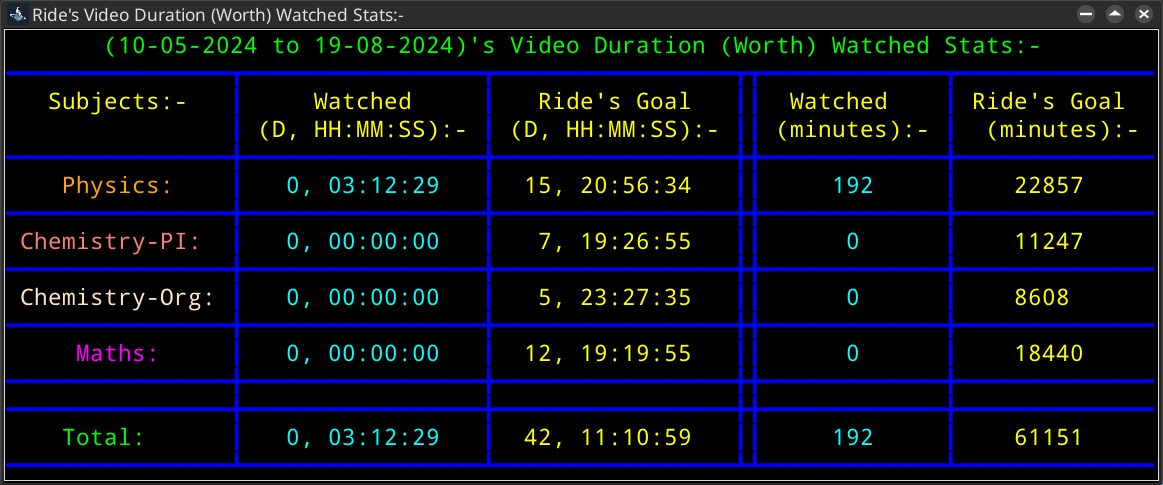
Video Duration (Worth) Watched Stats:-

This means:
Here, 'Worth' means the time duration of video(s) I have watched. This doesn't imply the real time I spent on it.
For example, if I complete a 1-hour video, this doesn't mean I really spent 1 hour (real time) on it, as factors like video speed, time taken for notes, etc., play a role. There is Real Time Spent stats below to show the time I really spent on this!The "(Today's or Month's or Ride's) Goal" column is the time duration I needed to watch for that (day or month or ride).
This goal is dynamically decided based on how many remaining days I have until the date I ideally want to have my theory (videos) preparation completed.In "HH:MM:SS", HH, MM, and SS stand for hours, minutes, and seconds respectively.
If D is also present, as in "D, HH:MM:SS", then D stands for days.
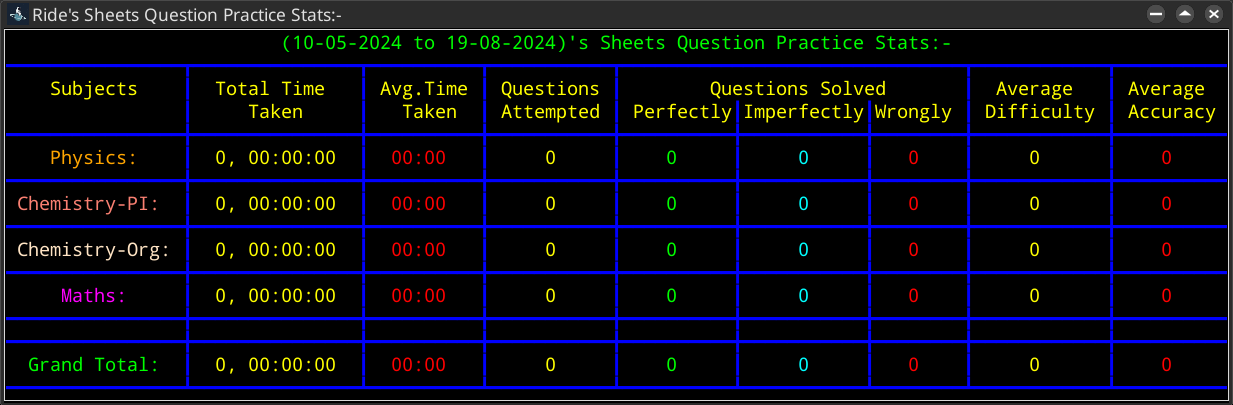
Sheets Question Practice Stats:-
This means:
Sheets is also known as Modules.
"Total Time Taken" is the total time spent on solving questions.
This doesn't include time spent on checking answers after solving, etc. There is Real Time Spent stats below for that!"Avg. Time Taken" is the average time taken per question.
This is calculated by dividing "Total Time Taken" by "Questions Attempted"."Questions Solved":-
"Perfectly": Questions that were solved without any errors, i.e., both concepts and calculations were correct.
"Imperfectly": Questions that were solved conceptually correctly but went wrong due to errors in calculation.
"Wrongly": Questions that were solved completely incorrectly, i.e., mostly due to conceptual errors."Average Difficulty" is the average difficulty per question.
This is calculated by dividing total difficultly (sum of individual question difficultly) by "Questions Attempted"
Values are as follows: Easy = 1, Moderate = 2, Hard = 3, Very Hard = 4.
Individual question difficultly is not provided in this stats."Average Accuracy" is the average accuracy per question.
This is calculated by dividing "Questions Solved Perfectly" by "Questions Attempted".If Time is in "HH:MM:SS", HH, MM, and SS stand for hours, minutes, and seconds respectively. If D is also present, as in "D, HH:MM:SS", then D stands for days.
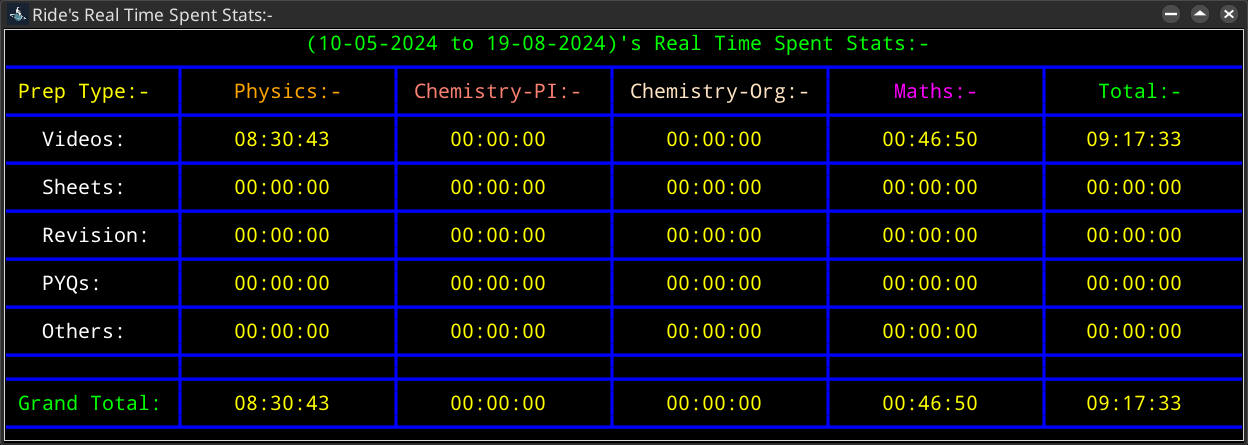
Real Time Spent Stats:-
This means:
"Real Time Spent" is the actual time I dedicated to a "Prep Type".
This is calculated by the sum of (End Time - Start Time) of a "Prep Type".
'Sum' in the above formula is used because, for example, if I watch videos from 8 am to 9 am, i.e., I spent 1 hour, and then stopped, and then continue from 10 am until 11 am, i.e., I spent 1 hour in this interval, but 2 hours in total. Sum is for the total interval of a "Prep Type".If Time is in "HH:MM:SS", HH, MM, and SS stand for hours, minutes, and seconds respectively. If D is also present, as in "D, HH:MM:SS", then D stands for days.
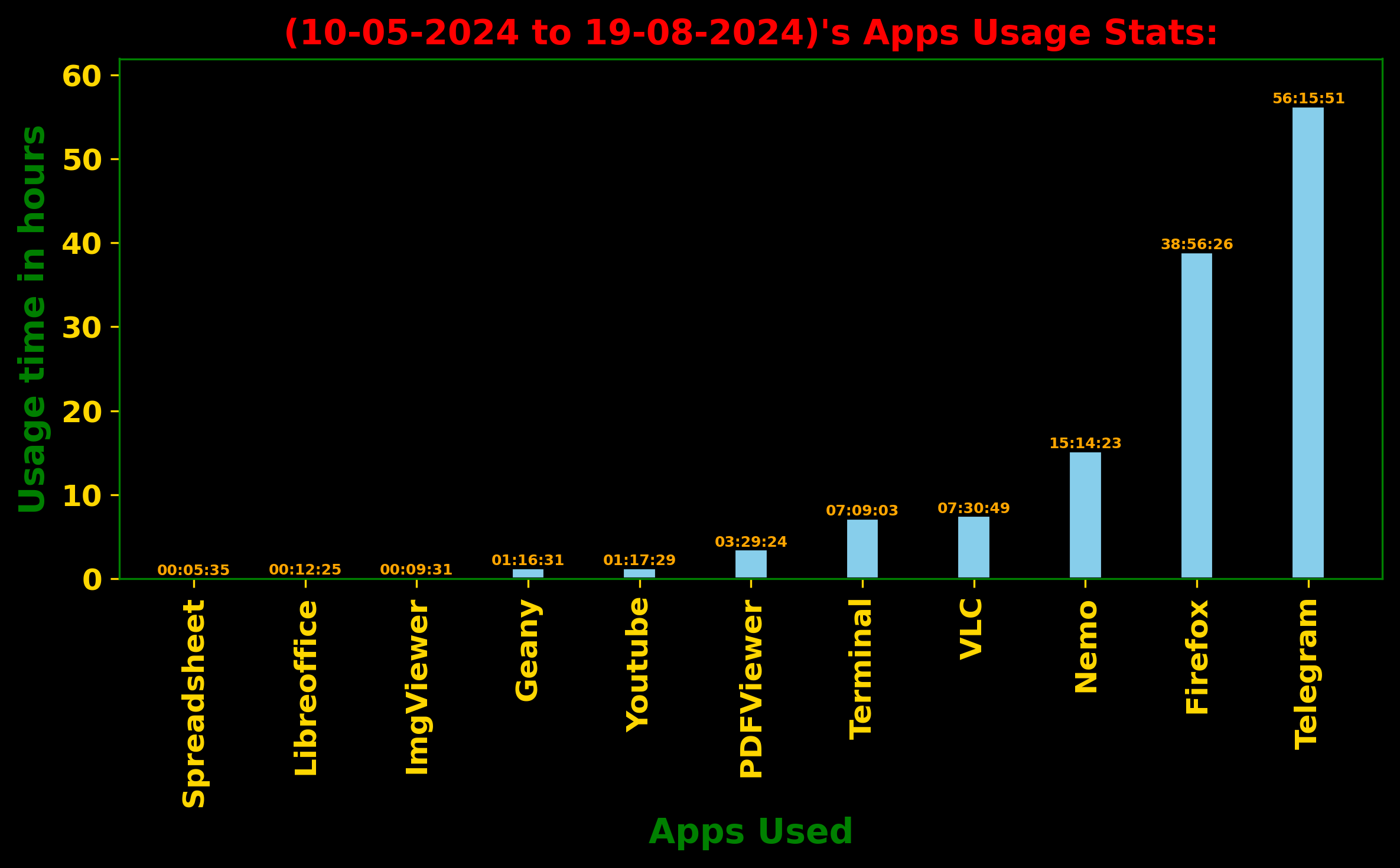
Apps Usage Stats:-
This means:
This is my screen-time.
Search (Google) the apps if you want to and have too much time in your hand to know what app is for what, might have to include 'linux' in search.X-axis is apps used, Y-axis is time duration app was used (in seconds).
If Time is in "HH:MM:SS", HH, MM, and SS stand for hours, minutes, and seconds respectively. If D is also present, as in "D, HH:MM:SS", then D stands for days.